
For churches, from Gloo
Your staff is small. Your mission isn't.
Mission Control puts agents in the channels where your staff's requests already land, gives every person on staff an assistant that works in their own tools, and keeps the whole week in one place before Sunday.
Sound familiar?
The week has a shape every church staff knows.
A handful of people carry the work of many, against a deadline that never moves.
Sunday comes every week
Slides, bulletins, volunteer schedules, and announcements are due on the same fixed deadline, every seven days.
Everyone wears five hats
A small staff covers communications, facilities, care, and administration on top of the ministry they were hired for.
Information lives in ten places
Planning Center, email, shared drives, and text threads each hold part of the picture, and nobody has all of it.
Questions arrive after hours
Volunteers and parents need answers on Tuesday night and Saturday morning, not just during office hours.
How it helps
Help that works the way a church staff works.
Agents sit in the channels where requests already land, and every person on staff gets an assistant that works in their own tools.
- Learn more
Agents that are part of your staff
Put Public Agents in the channels where requests land. They keep working in the cloud after every laptop is closed.
- Learn more
A personal assistant for every staff member
SuperGloo works as each person across their messages, calendar, tasks, and connected tools, on the Mac, on iPhone, and over iMessage.
- Learn more
One place for the week
The Feed, Messages, Projects, the Library, and calendars sit together, so the week's plan is never spread across ten tools.
- Learn more
Safe by design
Roles decide who manages what, new files start private, project agents stay inside their project, and SuperGloo asks before it sends anything to other people.
A week at your church
Monday to Friday, with the routine work already moving.
An ordinary week, with agents carrying the parts that repeat and people deciding the parts that matter.
- Monday
The week starts in the Feed
Ministry leads post what's ahead, and the Ops agent's scheduled summary of open tasks is waiting in #staff.
About Feed and Stories - Tuesday
Requests become tasks
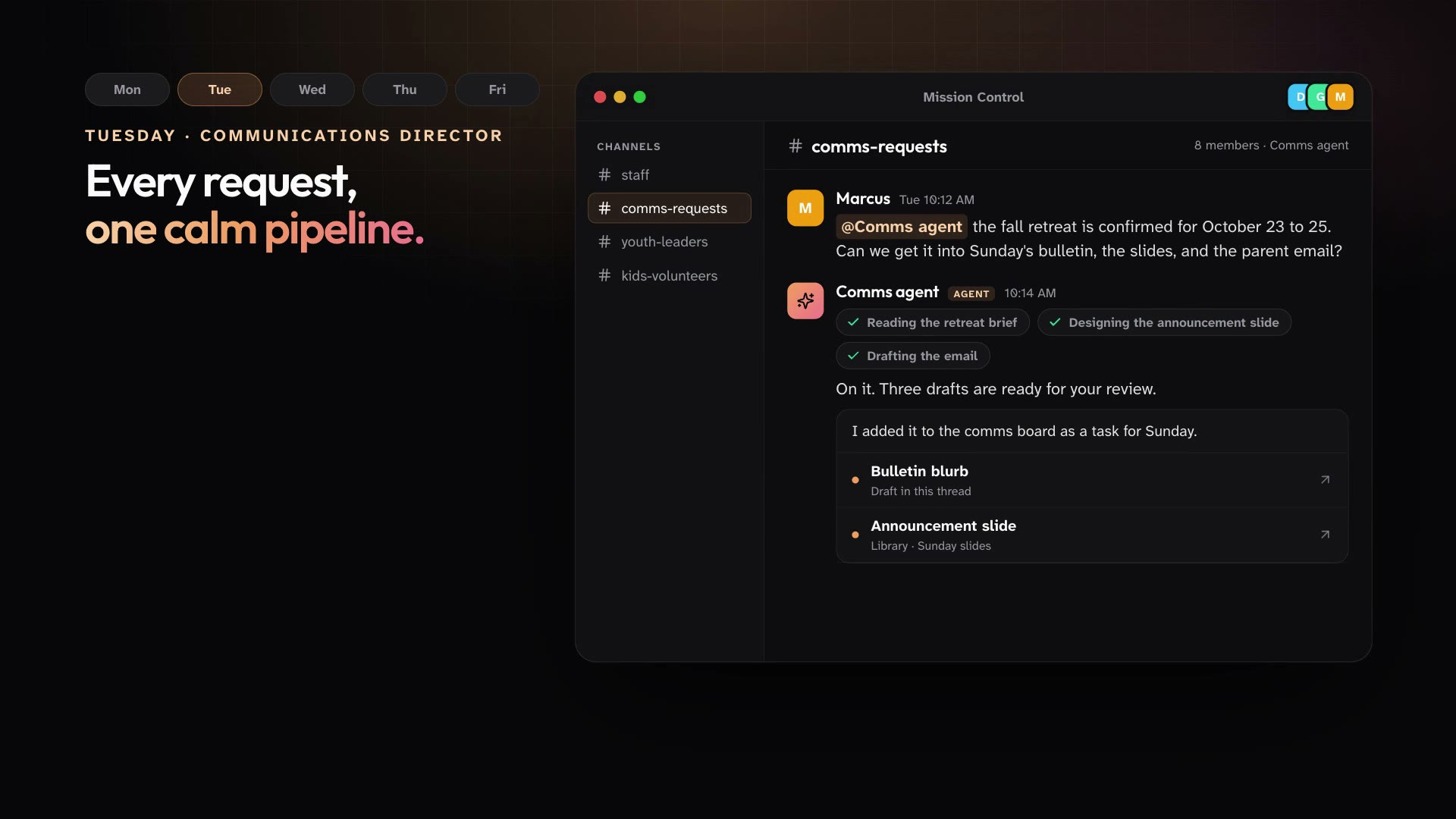
Ministries post their communications asks in one channel, and the Comms agent turns each one into a task on the board.
About Public Agents - Wednesday
Event logistics, sorted
The youth lock-in has its own Project with a channel, a board, and a calendar, and SuperGloo drafts the parent email between meetings.
About Projects and Boards - Thursday
Volunteer reminders go out
A scheduled agent posts Sunday's reminder to the volunteer channel, right on time.
About Triggers and automations - Friday
Ready for review
Announcement slides and a short announcement video are waiting in the Library for a final look.
About Design Studio
By role
Written for the people who run the week.
Pick your role to see the three plays that help most, and one request you could make on your first day.
Executive pastor
See every ministry without chasing every update
Status lives in people's heads
See the playsCommunications director
Every ministry's request, one calm pipeline
Requests come from everywhere
See the playsYouth pastor
Spend Wednesday night with students, not spreadsheets
Parent communication never ends
See the playsKids and family ministry
Every room covered, every family informed
Gaps show up Sunday morning
See the playsSmall groups and discipleship
Help every leader lead well
Leaders ask the same questions
See the playsChurch administrator
The office inbox, handled
Shared inbox triage
See the plays
Connections
Works with the tools your church already uses.
Connect them once. Then the people and agents who need them can work in them every week.
SuperGloo works in your accounts
Each person connects their own tools, from Planning Center to Google Workspace and Microsoft 365 apps, and SuperGloo works in them as that person.
Gloo Communications for agents
Connect it once for the workspace, choose the organization and what agents may do, and attach it to the agents that need it.
- Planning Center
- Gloo Communications
- Google Workspace
- Microsoft Outlook
- Microsoft Teams
- Slack
- Canva
- YouTube Data
- Zoom
- Calendly
Security
Careful with what your people trust you with.
Volunteer schedules, family details, and staff conversations deserve care. Here is how Mission Control keeps access in check.
How security works- Every member has a role. Owner, Admin, and Member are built in, and you can create custom roles from a catalog of workspace permissions.
- A project agent belongs to one project and is visible only to that project's members.
- New files in the Library start private to you until you share them.
- SuperGloo asks first before it deletes something, sends or posts to other people, or does more than you asked.
Get started
Have the week ready before Sunday.
Download the Mac app, invite your staff, and put your first agent in the channel where requests already land.
For Macs with Apple Silicon.