
For organizations, from Gloo
Agents your whole organization can work with, and govern.
Mission Control puts agents in the same channels, projects, and boards as your people, with shared context, parallel work you can follow, and the controls your admins expect.
Sound familiar?
Every department is trying AI. Almost none of it is shared.
Pilots stay private, tools stay separate, and nobody can see what the agents did.
AI pilots stuck in private chats
Every department runs its own experiment. Context is lost and work is duplicated from one department to the next.
Every tool is an island
Email, chat, documents, and trackers each hold part of the work, and agents can't see across them.
No visibility, no control
Nobody can say which agents exist, what they did, or what they cost.
Handoffs fall through
Work moves between people and tools and waits there until someone notices.
Why it works
Agents stick when they work where your organization works.
A private chat helps one person for one afternoon. A workspace gives agents the context, the visibility, and the rules that the whole organization needs.
- Shared context
Everyone works from the same picture.
Agents read the same wiki, boards, and threads as the department, so nobody re-explains the work, and the next person picks it up where the agent left it.
- A shared Workspace Wiki gives people and agents one memory, organized into spaces with their own access.
- Public Agents read, create, and update tasks on the boards of the projects they work in.
- Every published task gets its own Issue Channel that collects comments, changes, and agent run updates.
- Parallel and legible
Many tasks at once, and every one is easy to follow.
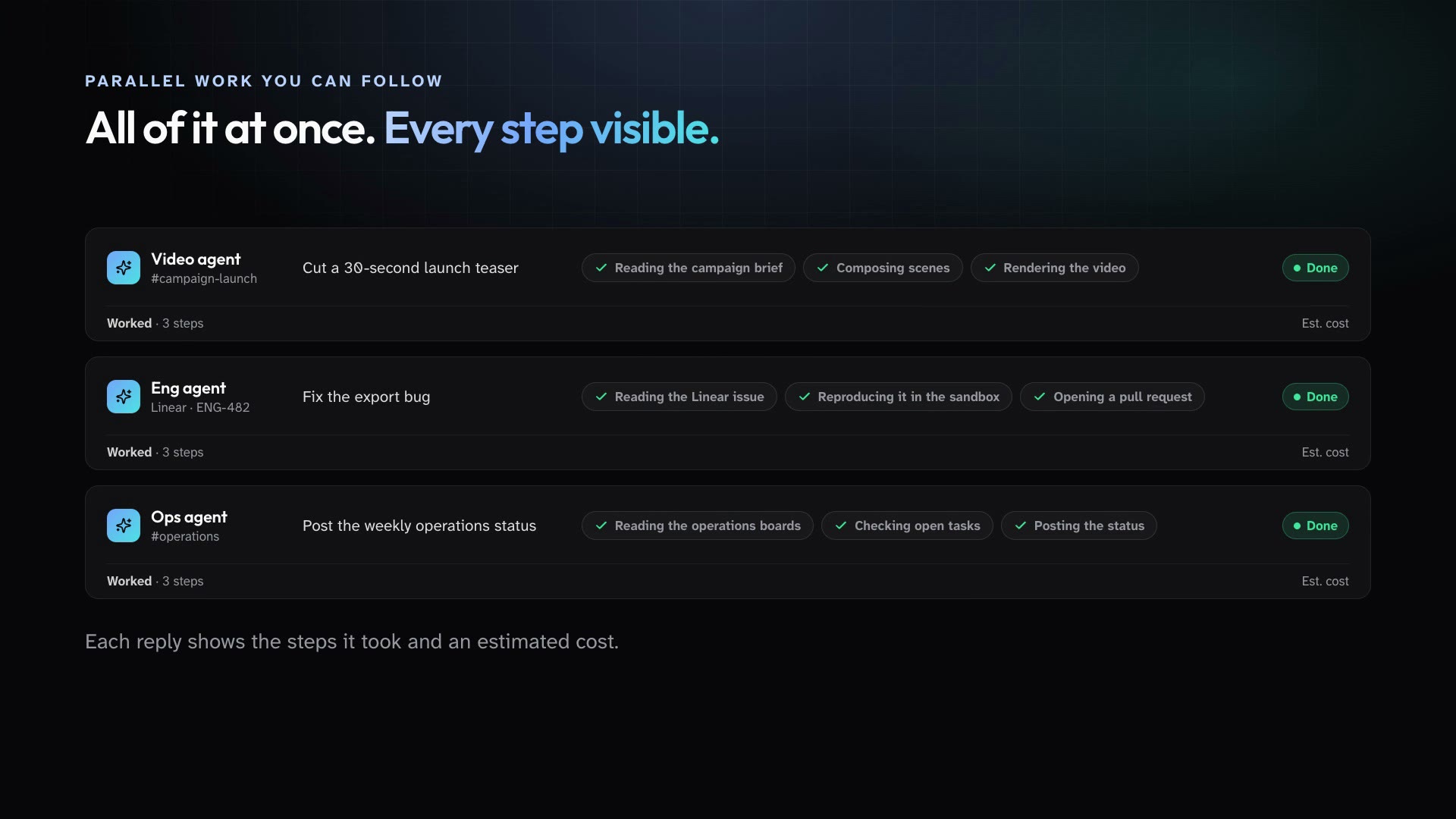
Hand off several pieces of work at the same time. Each one runs in its own thread and leaves a trail of what it did.
- Agents take on many tasks at once. Unrelated requests to the same Public Agent run in parallel, while work in one thread stays in order.
- In the desktop app, each Public Agent reply shows a Worked-for activity trail with the steps it took and an estimated cost for the run.
- Governed
Admins set the rules before anyone has to ask.
Roles decide who manages agents and connections, project agents stay inside their project, and governance changes are on the record.
- Every member has a role. Owner, Admin, and Member are built in, and you can create custom roles from a catalog of workspace permissions.
- A project agent belongs to one project and is visible only to that project's members.
- Governance changes are recorded in an append-only audit log that admins can review.
- Extensible
Connect the systems your organization already runs.
Bring your own MCP servers, reach the workspace from your scripts and AI tools, and start agent runs from your own systems.
- Admins add custom MCP servers for the whole workspace and choose which people and agents can use each one.
- Workspace API keys let your own scripts and AI tools work with the workspace through a REST API and a hosted MCP server.
- Public Agent triggers run on a schedule, on workspace events, or from a webhook, and post their results to a channel.
What you get
Everything a department needs to work with agents.
Five parts of the product that do the heavy lifting. Each one links to how it works.
- Learn more
Agents as accountable members
Public Agents live in projects and channels like everyone else. Scope them to one project, restrict them to an allowlist, and pause or archive them at any time.
- Learn more
Shared context
The Workspace Wiki, the Library, Messages, and each task's Issue Channel give people and agents the same picture.
- Learn more
Parallel work you can follow
Agents take on many tasks at once, and every reply shows a Worked-for trail with its steps and estimated cost.
- Learn more
Governed by default
Roles and custom roles, an append-only audit log, a curated model catalog, provider keys that stay on the server, and usage estimates by member and agent.
- Learn more
Extensible
Add custom MCP servers, connect your own tools with workspace API keys and a hosted MCP server, start runs from webhooks, and hand coding work to the harness you use.
By function
Written for the departments that keep things moving.
Pick a function to see three plays and one request you could hand off on your first day.
Operations
Recurring work runs itself. Exceptions reach a person.
Weekly reports assembled by hand
See the playsMarketing
From brief to deck to video in one thread
Content bottlenecks
See the playsProduct and engineering
Agents in the loop on Linear, GitHub, and code
The triage backlog
See the playsCustomer success
Every client follow-up, on time
Follow-ups slip
See the playsLeadership
Know what's happening without another status meeting
Status meetings
See the plays
Connections
Works with the stack you already run.
People connect their own accounts. Admins decide what the workspace's agents can reach.
SuperGloo works in each person's accounts
Each person connects their own Google Workspace, Microsoft 365 apps, Slack, Zoom, and more, and SuperGloo works in them as that person.
Agents reach only what admins attach
Public Agents work in GitHub and Linear through their own connections, plus the custom MCP servers your admins attach to them.
Your own systems, too
Workspace API keys give your scripts and AI tools a REST API and a hosted MCP server, and webhook triggers start agent runs from anywhere.
- GitHub
- Linear
- Custom MCP servers
- Google Workspace
- Microsoft Outlook
- Microsoft Teams
- Slack
- Figma
- Zoom
Security
Controls your admins can stand behind.
Every agent answers to the roles and settings you choose. Three of the controls in Mission Control today:
See every control- Every member has a role. Owner, Admin, and Member are built in, and you can create custom roles from a catalog of workspace permissions.
- Governance changes are recorded in an append-only audit log that admins can review.
- Model provider keys stay on the server. The apps reach models through an authenticated proxy and never hold a provider key.
- Single sign-on through WorkOS.
Not available today. Planned work, not a commitment to a date.
Get started
Put your first agent to work this week.
Download the Mac app, invite one department, and hand an agent a piece of recurring work.
For Macs with Apple Silicon.